





Skip to content

Guide · Updated October 24, 2026

How to rank in AI Overviews

To rank in AI Overviews, your page must first be indexed and eligible for a snippet in Google Search; Google says there is no extra requirement or special file. Then cover the questions behind the search clearly, earn mentions on the pages Google already links to, and check the real AI Overview over several days.

Placton tracksChatGPTClaudeGoogle AIPerplexityGrok

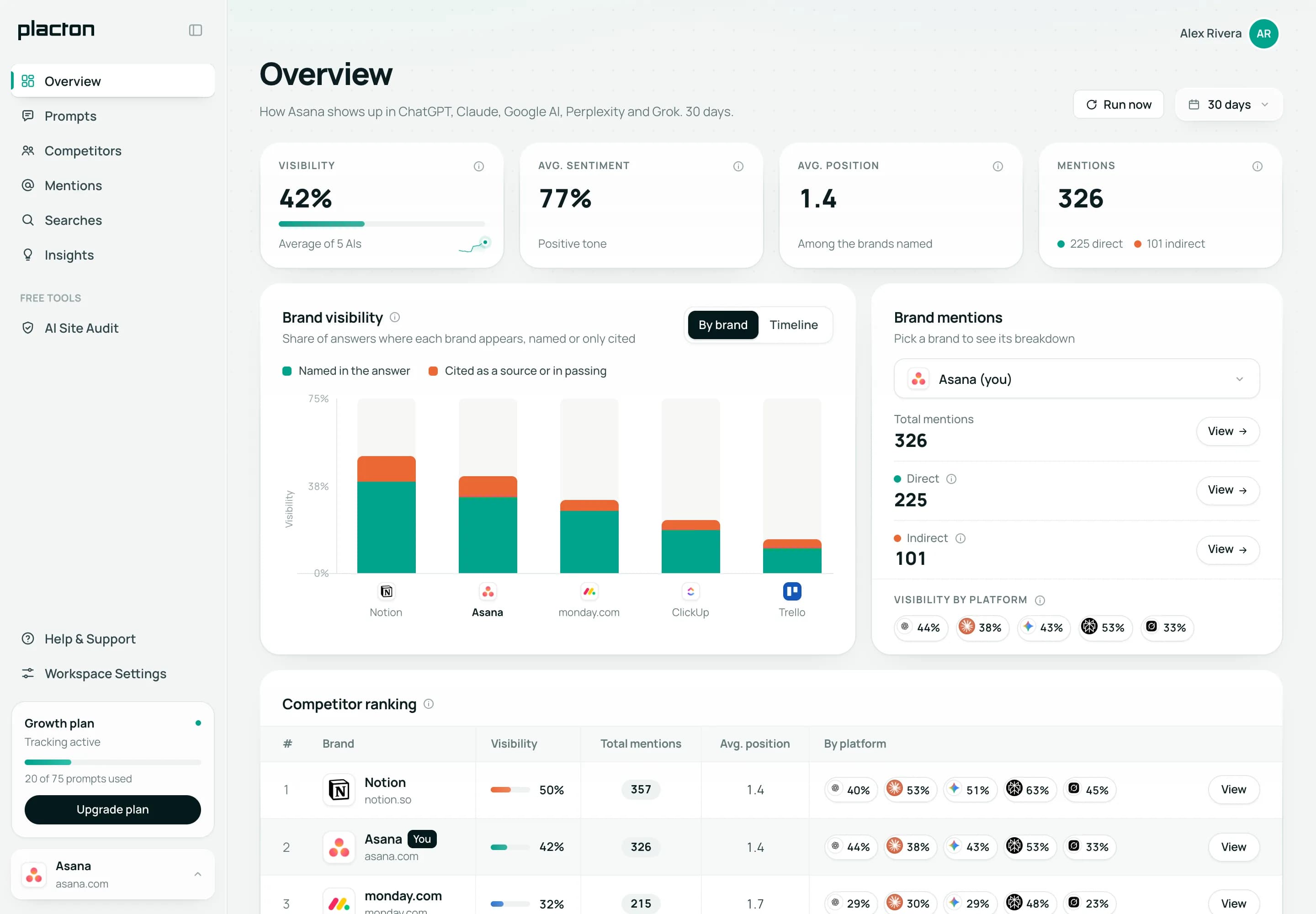
Placton dashboard: visibility, sentiment, average position and mentions, a chart of direct and indirect mentions by brand and the competitor ranking.

How Google picks the sources in an AI Overview

AI Overviews are part of Google Search, so Search rules apply. Google documents three things that matter for the links.

Only indexed pages can be linked

Google says a page must be indexed and eligible to show in Search with a snippet to appear as a supporting link. There is no extra requirement, and being eligible does not guarantee a link.

One search becomes several

Google may run related searches across subtopics, a technique it calls query fan-out, and says this lets it link a wider, more varied set of pages than a classic results page.

The controls are the usual ones

Googlebot rules in robots.txt, noindex, nosnippet, data-nosnippet and max-snippet decide what Google can show from your pages, AI Overviews included. Google-Extended covers AI training and grounding in some other Google systems, not Search.

Google does not say how it chooses one eligible page over another. The practical consequence: a page can earn its link by answering one part of the question well, even when it is not the top result for the search itself.

Google search: “how to create a project timeline”

Google AIGoogle AI·October 21
Cited as a source

To create a project timeline:

  1. List the deliverables and break each one into tasks.
  2. Estimate how long each task takes and note which tasks depend on others.
  3. Set milestones for key dates, such as reviews and the launch.
  4. Give every task an owner.
  5. Lay it out in a Gantt chart or timeline view and update it as work moves.

Project management tools can build the chart for you from your task list.

An AI Overview in Placton that links your page without naming you: an indirect mention (example data).

How to appear in Google AI Overviews: 6 steps

No shortcuts and no promises: these steps make your pages easy for Google to pick and to quote.

  1. Make the page eligible for a snippet

    Check that the page you want linked is indexed, has no noindex or nosnippet, is not cut short by max-snippet, and that Googlebot can reach it through robots.txt and your CDN. URL Inspection in Search Console shows how Google sees the page and lets you ask for a recrawl after a fix. Our free GEO audit tool checks indexing, the canonical URL and robots.txt on your homepage.

  2. Find the searches that show an AI Overview

    Run your target searches in your market and language, logged out, on more than one day. Keep the ones where an AI Overview appears, and start with those where rivals are linked and you are not.

  3. Answer the questions behind the search

    List the follow-up questions a buyer would have, such as cost, time, alternatives or who it suits, and answer each under its own heading on the page you want linked. That mirrors the way Google splits one search into several.

  4. Put the answer in text, near the top

    Open each section with a direct answer of one or two sentences, then give the detail. Google’s advice is to keep important content as text and to support it with images or video where they help.

  5. Earn a place on the pages already linked

    For buying searches, AI Overviews often link comparisons, directories, forums and review sites. See which of them name your rivals and not you, and work on being listed, reviewed or quoted there. How to find them across many searches: AI citation tracking.

  6. Keep your Google listings current

    Google lists an up-to-date Business Profile and Merchant Center information among its best practices for AI features. For a local business or a store, those details can be exactly what the answer quotes.

See what AI can read on your website

We run 18 checks on what helps AI assistants find, read and cite your site, and tell you what to fix first.

Ready as soon as you sign up, included in the free trial.

No account? Free GEO audit tool: the same 18 checks, without signing up.

How to optimize content for AI Overviews

Google needs no special format. These habits make a page easier to quote, and readers like them too.

  1. A title and H1 in the searcher’s words. Use the phrase people type, not your internal name for it.

  2. The answer first. Forty to sixty words that answer the search on their own, right under the H1. This page opens the same way.

  3. One heading per sub-question. Cost, steps, alternatives, who it suits: each under a heading that reads like the question.

  4. Lists and tables for comparisons. Steps as numbered lists, specs and prices as tables: easy to scan and to lift.

  5. Facts you can check. Numbers, dates and named sources, plus a visible “updated” date when the facts change.

  6. Structured data that matches. Article, FAQPage, Product or LocalBusiness where they fit, saying exactly what the page shows. Google asks for that match.

None of these is a Google requirement, and none of them guarantees a link.

No AI Overview for your search? What to do

Many searches never get an AI Overview, and some get one only on certain days or in certain markets. Before you drop a search, go through these five questions.

  1. 01

    Is it really missing in your market?

    Search logged out, in your buyers’ country and language, on three different days. A single look can land on a day without one.

  2. 02

    Do buyers phrase it another way?

    A full question often brings a different results page than a two-word term. Try the “how do I choose…” and “best… for…” versions next to the short one.

  3. 03

    Does it show up on some days?

    Then keep working on it. You want to be in the AI Overview on the days Google shows one, and those days count.

  4. 04

    No AI Overview in a whole month?

    Treat it as a classic results page, where regular SEO decides who gets the click, and follow a phrasing that does trigger an AI Overview instead.

  5. 05

    Does the question still matter elsewhere?

    Buyers ask the same thing to ChatGPT, Claude, Perplexity and Grok, which answer whether Google shows an AI Overview or not.

How Placton counts the days without one, so they do not drag your score down, is on the AI Overview tracker page.

What Google says you do not need

Straight from Google’s guide to AI features, last updated .

A special AI file

Google says you do not need new machine-readable files, AI text files or new markup to appear in AI features, so llms.txt is not what gets you into AI Overviews. If you publish one for other AI tools, test it with the free llms.txt checker.

A separate optimization

Google says there are no extra requirements or special optimizations for AI Overviews beyond its usual Search guidance.

Allowing Google-Extended

Allowing or blocking Google-Extended does not control AI Overviews. They are part of Search, so Googlebot and the snippet controls decide.

Markup for its own sake

Structured data is not required. If you use it, Google asks that it match the visible text on the page.

See your AI Overviews free for 7 days

Placton reads the real AI Overview for each of your searches, keeps the full text and every link, and lines it up with ChatGPT, Claude, Perplexity and Grok.

  • 7 days free, no card. Sign up with your email or Google. When the trial ends, tracking stops and nothing is charged.

  • Up to 10 prompts. We suggest prompts and competitors from your website, and you edit the list before the first run.

  • All five AI platforms on day one. ChatGPT, Google AI Overviews, Claude, Perplexity and Grok answer your prompts as soon as your email is confirmed.

  • ChatGPT and Google AI again every day while you keep visiting your dashboard. Claude, Perplexity and Grok are asked once, at sign-up.

  • One “Run now” and the 18-point site audit. After the trial, our free GEO audit tool still audits any site, without an account.

  • On paid plans only: team invites and the weekly email summary with alerts.

* On paid plans. ChatGPT is read on chatgpt.com in every country Placton tracks except Venezuela and Puerto Rico, where it is asked weekly through its API.

Placton Starter

Track 20 prompts on 5 AI platforms

$59/ month (USD)

Or $602 billed yearly · save $106

Start your 7-day free trial

7 days free. No card required.

  • Up to 20 prompts, about 1,440 answers a month
  • ChatGPT, Google AI Overviews, Claude, Perplexity, Grok
  • ChatGPT and Google AI every day*, the other three every week
  • Competitor ranking (up to 25 rivals) and every cited URL
  • Weekly insights, plus an email summary with alerts
  • 18-point AI-readiness site audit
  • Up to 2 team members

Need more prompts? Growth is $129 a month for 75 and Scale $299 for 250. Compare all plans

Sources for this guide

Everything this guide attributes to Google comes from AI features and your website (opens in a new tab) on Google Search Central, last updated and read on . The rest is practical advice: Google does not publish how it ranks the links inside an AI Overview. We make Placton, so weigh our view accordingly.

On Google, Placton reads AI Overviews only: not AI Mode and not the Gemini app.

Questions about ranking in AI Overviews

About Placton itself? Read the full FAQs or see every plan and price.

How long does it take to appear in an AI Overview?

First Google has to crawl and index the page; after a change you can ask for a recrawl in Search Console. Then there is no set delay, and the same search can link different pages from one day to the next, so judge it over several weeks.

Do I need to rank on page one to be linked in an AI Overview?

Google does not say so. Its stated requirement is that the page is indexed and eligible for a snippet, and it says AI Overviews can link a wider set of pages than the classic results. Pages that rank for the related searches are simply more likely to be among the ones it reads.

Does structured data help you appear in AI Overviews?

It is not required. Google asks that any structured data match the visible text, and it helps Google read facts such as prices or opening hours correctly. It does not get a page linked on its own.

Can I keep my content out of AI Overviews?

Yes, with the same controls as regular snippets: nosnippet, data-nosnippet and max-snippet limit what Google shows, and noindex removes the page from Search. They affect your regular snippets too. Blocking Google-Extended does not do it.

Does Search Console show AI Overview traffic?

Google says clicks and impressions from AI features are included in the Performance report, under the Web search type, together with the rest of your search traffic.

What the free reports cover

Why does the AI Overview link my page but not name my brand?

Because the page answered part of the question, not the question of which brand to pick. Say plainly on that page what you offer and for whom, and work on the third-party pages that compare brands. Placton counts a link without your name as an indirect mention.

How do I see whether my brand appears in AI Overviews?

Search your buyers’ questions logged out in your market, on several days, and note who is named and linked. Placton does it for you: on paid plans it reads the real AI Overview for every search every day, and records “no answer” when Google shows none.

AI Overview tracker

Can anyone guarantee a place in AI Overviews?

No. Google decides what to show for each search and says eligibility does not guarantee a link. Be wary of anyone who promises a spot, Placton included.

Can I try Placton for free?

Yes. The 7-day trial needs no card, covers up to 10 searches and shows Google’s AI Overviews on day one, along with ChatGPT, Claude, Perplexity and Grok. Paid plans start at $59 a month. Separately, our GEO audit tool runs the 18-point site audit for free, with no account, before or after the trial.

See every plan and price

See whether Google links you in AI Overviews

Start with the searches you picked above. Placton shows which ones get an AI Overview, whether it links your pages and which rivals it names instead.

Start your 7-day free trial

7 days free. No card required.

Compare all plans